Wednesday, December 22, 2010

Our favorite Docs things - 2010 Year in Review

[Cross-posted from the Google Docs Blog]

We’ve been keeping busy this year with over 85 new enhancements to Google Docs and Google Sites, making it possible for you to work, communicate and collaborate entirely in the cloud. We wanted to take a moment to share a few of the most exciting enhancements from 2010 that are making it easier for you to go “100% web.”

In addition to some of the most requested favorite features like mobile editing, OCR, advanced sorting rules and a more consistent look, here are more of our team’s favorite things from this last year:
We look forward to bringing you more improvements next year. Let us know what is at the top of your Google Docs and Sites wish list in the comments.

On behalf of the entire the Google Docs and Google Sites teams, happy holidays! We’ll see you in the New Year!

FCC Moves to Halt Internet Service Provider Content Discrimination and Preferences

The Federal Communications Commission has moved to keep Internet service providers from limiting or unreasonably discriminating against content provided by competing services

The regulations are designed to keep telephone and cable companies that provide phone services from using their Internet services to limit use of Skype and other online telephone services. It is also intended to halt them from making content provided by audio and video service providers they do not own less desirable by limiting downloads from firms such as Netflix or Hulu or providing faster service only for their own content.

The rules are designed to maintain a level competitive position on the Internet and to restrict the abilities of companies that dominate access to the Internet from using oligopolistic control of the service points to harm content competitors.

The regulations require that services allow their customers equal access to all online content and services, but allow the services some flexibility to management network congestion and spam as long as the rules are clear and not anti-competitive.

The rules apply to fixed line services, but do not apply equally to wireless telephony which is becoming the primary means of Internet access though smart phones and electronic tablets and e-reader. Mobile phone providers are permitted to provide preferential access to their services or selected partners, but the rules forbid mobile providers from blocking access to competing sites and services. Mobile services are given more leeway to manage their networks because capacity is more limited than on the Internet.

The regulations are an important step in ensuring that major service providers such as Comcast and Verizon are not allowed to use their dominance in service provision to harm other companies and the FCC should be applauded for its efforts. Such companies have in the past shown their willingness to take advantage of their monopoloy power and are not widely noted for their consumer friendliness.

Major service providers and Republicans are vowing to fight the move, arguing that the FCC does not have the authority to issue such regulations. If the courts side with them on the issue, Congress should explicitly give it the authority or empower the Federal Trade Commission to ensure competivieneess online.

Tuesday, December 21, 2010

Enhance your productivity with more applications for Google Apps

[Cross-posted from the Google Enterprise Blog]


Last month we launched an improvement that makes more than 60 additional Google services available to Google Apps users. Since the launch, we’ve featured posts from product teams across Google to showcase how you can benefit from the new services.


Our colleagues working on Google Reader, Google Alerts, Google News, and Google Finance described how their products give you new ways to discover content on the web. The Blogger and YouTube teams shared how their services can be used to connect with your customers and communicate information about your products and brand. We also featured posts from the Google Analytics, Google Website Optimizer, Google Custom Search, and Google Translator Toolkit teams to highligh tools that help your company build and optimize your web property. Posts from Google AdWords and Google Places showed how you can make it easier for potential customers to discover your business when they are searching online, and a post from Google Checkout described how you can let visitors purchase products from your site once they arrive. And if your business isn’t built around an online transaction model, the Google AdSense and DoubleClick for Publishers teams outlined tools that you can use to efficiently monetize traffic to your website. We also featured posts on Picasa Web Albums and Google SketchUp & 3D Warehouse that highlighted use cases for sharing and editing photos and 3D images at your organization. Finally, posts from Google Voice and Google Chrome Sync featured products that leverage the power of the web to allow you to work seamlessly across multiple devices, so you’re not tied to your desk phone or desktop PC to be productive.

This series has highlighted a few ways that you can use these additional Google applications, and we’re confident that you will discover many new and interesting use cases that fit your business. You can explore even more exciting Google services now available with your Google Apps account at http://www.google.com/apps/more.

All of these new services can be enabled by your domain administrator from the Google Apps Control Panel at https://www.google.com/a/[your_domain.com] (replace [your_domain.com] with your actual domain name). Your domain administrator can grant different groups of users access to different sets of applications, so your company can get up and running today with more than 60 productivity-boosting applications matched to those users that will benefit from them most.


Note: Some products may not be available in all areas.

Tips for creating a free business listing in Google Places: business types


Are you curious about what kind of businesses are eligible to appear in the free listings that appear on Google and Google Maps? In this second post in our blog series about how to create a clear and effective business listing via Google Places, we’ll help you to determine if Google Places is right for your business.

Business types and models that work with Google Places

Google Places is meant to facilitate customer interaction with brick-and-mortar businesses and service providers. Therefore, the business owner or employee who is officially authorized to represent their particular business location must have a physical address in order to comply with our quality guidelines.

Having a physical address means that your business has a specific location (typically including a street name and a street number), can be visited by potential customers or business partners, and has a specific phone number at that location where you can be reached during operating hours. Including your physical address in your free business listing helps customers figure out where they can find you.

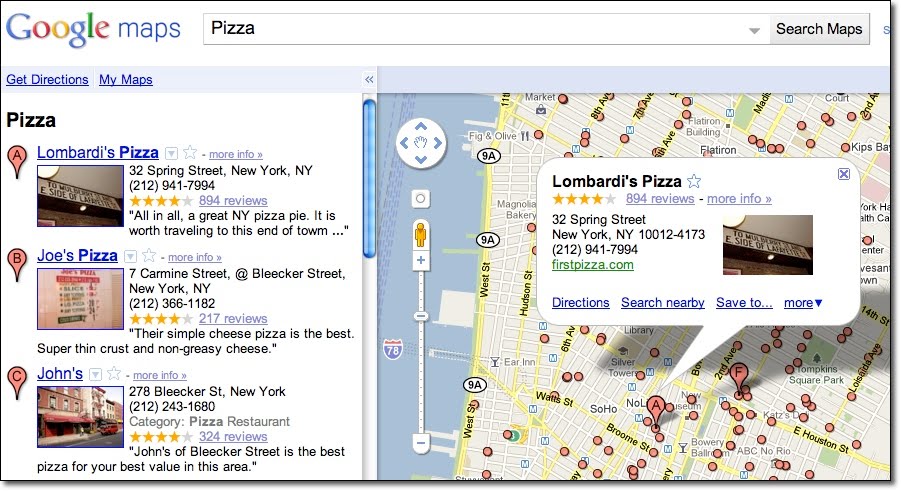
Examples of business listings displayed on Google Maps


Businesses that aren’t right for Google Places

Here are a few examples of business types that are not currently eligible to use Google Places:
  • Web shops that operate exclusively online and have no office for visitor traffic or direct client interaction
  • Businesses without actual physical locations (your living room, the airfield where you offer paragliding lessons, nor the river where your rafting tours start do not qualify as business locations)
  • Companies with non-permanent locations like a farmers market stall, a mobile hot dog vendor, or a one-time concert event at a local cafĂ©
  • Real estate companies that don’t have a central office and are trying to advertise individual apartments where no one can be reached in person or by phone
For operations like these, rather than appearing in Google and Google Maps search results associated with a physical location, other online tools might better fit your needs. One option is to advertise and generate awareness about your business activities through Google AdWords. This cost-effective program enables you to get the word out about your business, website or event via online ad campaigns, and does not require you to have a brick-and-mortar business address.

How to create a free listing if you’re eligible

If you’re a business with a physical office location that is open to customers and staffed both in person and via phone during regular business hours, we encourage you to create a free listing by signing in to Google Places here. For example, a real estate company with a corporate office can add the services it offers, the apartments it sells, and so on in the description field of the listing.


Be careful to create just one listing per physical location and to create listings only at places where your business is actually located. For example, if you run a DJ service and your office is at 41 Broadway in New York, you should only add that location in Google Places, even if you also DJ at 32 Main Street and at 14 Smith Street.

How to indicate service areas

For businesses that have one physical location but also offer their services elsewhere - such as the aforementioned businesses as well as locksmiths, translation services, delivery pizzerias, cleaning services and the like - you can use the Service Areas feature in your Google Places account. Marking a service area enables you to show your potential customers the range of places where you work.


Businesses that require travel to meet customers can define a radius around their main location or select specific areas they serve. If your main location is your home address and only used to receive business-related mail and phone calls, you can also hide that address and only show the service area in which you operate. This might be the case for babysitters, DJs, household services or IT repair services. Detailed instructions about how to set up this feature can be found in our help center.

Taxi and courier companies are particularly good examples for the use of the Service Areas feature. They offer a service that is location-independent and therefore shouldn't be associated with fixed locations on Google Maps. Even if you can find taxis often in front of train stations or airports, these are not locations owned by the business. The service area feature allows taxis to indicate the area in which they operate. If the taxis are coordinated over a dispatch centre, that can be listed as one physical location, otherwise the address should be hidden.

How to verify a listing

In order for your free business listing to appear on Google and Google Maps, you must verify your business via Google Places. This simple process includes providing a verification code by mail, automated call or text message. The phone number used for this process will be shown in your listing, so be sure that the number directs calls to your business.

We hope this information helps to explain our Google Places quality guidelines around setting up a free business listing. If you have any further questions about the types of businesses that are eligible for inclusion in Google Places, please visit our Google Places help forum.

Posted by Lina Paczensky, Local Search Quality

Monday, December 20, 2010

Display advertising helps one small business minimize India’s education gap

Dinesh Mehta and Rajat Verma had always been aware of inequities in India’s educational system. As the gap widened, Mehta and Verma wondered how they could use technology to provide higher quality education to more people. In 2006, they founded TopChalks.com to provide technology enabled educational and training solutions for a wider population.

TopChalks works with some of India’s best instructors to develop and produce educational content for digital platforms. ‘With TopChalks content, students have the option to study online, with CDs, through handheld devices or on digital broadcast platforms such as digital cable TV,’ says Director of Products and Engineering Vishal Chadhuary.

TopChalks ambassador Javgal Srinath (Indian Cricketer)

Since TopChalks seeks to democratize education largely via digital content, Chadhaury turned to the Google Display Network to market the educational experience. ‘Our products are very unique in nature,’ says Chadhuary. ‘Once we show potential customers what we are offering, they better understand our products. All our ads have a demo button which leads to an actual product demo.’

To ensure he’s seeing positive results from his display ads, Chadhuary pays close attention to the performance of the ads across the Display Network. ‘We keep a close eye on which sites to exclude or add as managed placements,’ says Chadhuary. ‘When we see a site with a stronger clickthrough rate, for example, we might add this site as a managed placement.’

Chadhuary also monitors the effectiveness of his display ads by testing multiple formats for each ad. He then tracks the clickthrough rate of each ad and either pauses the poorer performing ads or edits them to mimic the well performing ads.

TopChalks ambassador Javgal Srinath (Indian Cricketer)

Chadhuary’s diligence with the Google Display Network proves that small businesses can use display advertising to generate new business. ‘Now we get well over half of our leads from ads on the Google Display Network,’ says Chadhuary. ‘There are numerous education websites with great content and millions of users. Showing relevant ads there generates good quality leads for us.’

Mehta, Verma, and Chadhuary’s vision to impact India’s education is spreading with rapid success. With the help of display ads, they are able to clearly communicate and actually show customers what they can achieve with TopChalk’s help. ‘With India growing at a rate that it is, we believe that such growth cannot be sustained and will not be meaningful unless we think out of the box and educate the masses,’ says Chadhuary. ‘Every person in the company is driven by this vision.’

Posted by Julian Sonego, Marketing Manager, Google Display Network

Friday, December 17, 2010

Now available with Google Apps: Google Chrome Sync

[Cross-posted from the Google Enterprise Blog]


Editor’s note: We recently launched an improvement that makes over 60 additional Google services available to Google Apps users. This series showcases what’s new and how your organization can benefit.


Welcome to Google Chrome Sync
These days, we spend more and more time working in a web browser, in fact, the number of hours the average American spends online has grown by over 120% in the last 5 years.* Much of the information we consume is delivered through the web, and tools like Google Apps make it easier than ever for workers to collaborate and create using nothing but the web. This shift of data and applications to the cloud makes us less dependent on the specific hardware device that we use to get our work done.

You may use a desktop or laptop PC or Linux box at your desk, then a netbook or maybe even a pilot program Chrome OS notebook when you’re on the go, and then perhaps work from a personal computer when you need to send a quick email from home. Traditionally, your experience has been different on each of these devices depending on how the browser is configured. Now, recently added integration with Google Apps lets you unify your browsing experience across the different devices you use to get your work done, just like millions of Chrome users already do with Google Chrome Sync.

Google Chrome is a modern web browser that was built with today’s web in mind, with a focus on speed, security, and simplicity, and it’s used by more than 120 million people worldwide. One of the features of Chrome that makes it so simple and easy to use is the ability to synchronize your bookmarks, extensions, apps, theme and browser preferences with a Google account, so they are always available in the browser, no matter where you are signed in. Google Apps users now have access to this functionality, allowing you to make these components of your browsing experience available across any device you use to access the Chrome browser.


With Chrome Sync, many of the inefficiencies that result when you switch from one device to another are eliminated. When you bookmark a news article relevant to your business on your desktop PC as you're running out the door to catch a flight, that bookmark will be there when you connect to WiFi as you’re waiting at the airport. The Google Mail Checker extension you discovered last week was synced to your laptop so you notice the email that comes in at the last minute before you close your laptop for take-off. And when the passenger in the seat next to you spills coffee on your keyboard in the middle of the flight, you’re secure in the knowledge that Chrome on your new laptop will have all of the personalization you added on your old one.

Now that Google Chrome is ready for business, Chrome and Chrome Sync combined with Google Apps make a powerful combination for workers leveraging the power of the cloud to be productive no matter where they are and what device they are using.

Learn more and get started
Google Chrome Sync can be enabled by your domain administrator from the Google Apps Control Panel at https://www.google.com/a/[your_domain.com] (replace [your_domain.com] with your actual domain name). If your organization isn’t using Google Apps yet, you can learn more and sign up today at http://www.google.com/apps/more.

You can find more information about using Chrome in your organization on our Chrome for Business webpage or take a look at a product overview.


Note: Google Chrome Sync may not be available in all areas.
* Forreseter Research, 2010

Thursday, December 16, 2010

Now available with Google Apps: Picasa Web Albums

[Cross-posted from the Google Enterprise Blog]


Editor’s note: We recently launched an improvement that makes over 60 additional Google services available to Google Apps users. This series showcases what’s new and how your organization can benefit.


Welcome to Picasa Web Albums
Sharing and collaboration are central to Google Apps with over 30 million users in businesses, schools, and government already using products such as Gmail, Google Docs and Google Sites to work together more efficiently. As part of the effort to enhance the tools available to our Apps users, we’re pleased to bring the the photo sharing capabilities of Picasa Web Albums to your Google Apps account.

Picasa Web Albums makes it easy to organize, share and edit your photos, and collaborate with others. You can create web albums to group your images, add tags for organization and searching, edit your photos using Picnik to ensure they look their best, add places to your photos with geotagging via Google Maps, and easily share your photos with colleagues.

Whether it’s photos from a recent corporate offsite or holiday party, or visuals for insertion in a document or blog post, Picasa Web Albums allows you to store your images in the cloud and access them from any browser on any device. Sharing with colleagues is easy as well using your Google Apps account with email address autocomplete linked to your existing Contacts list.


Uploading, storing and sharing your photos is just the beginning. Picasa Web Albums is also integrated with other Google products such as Google Docs, Google Sites and Blogger, which allows users to seamlessly insert images stored or shared with you in Picasa Web Albums into documents, sites or blog posts in just a few clicks. It’s never been easier to compose a multimedia document using nothing but the web.


Stop sending photos to colleagues as attachments and load them into the cloud instead. Just like Google Apps, Picasa Web Albums runs in your web browser so your photos are at your fingertips anywhere you have an Internet connection.

Learn more and get started
Picasa Web Albums can be enabled by your domain administrator from the Google Apps Control Panel at https://www.google.com/a/[your_domain.com] (replace [your_domain.com] with your actual domain name). If your organization isn’t using Google Apps yet, you can learn more and sign up today at http://www.google.com/apps/more.

You can learn more about Picasa Web Albums in our Help Center or you can stay up to date on product news as well as tips and tricks on our blog.


Note: Picasa Web Albums may not be available in all areas.